Core Lessons: Industry
Below lists out all modules and lessons included within this curriculum.
Lessons are in video format with downloadable project files.
Core Lessons:
Industry
Below lists out all modules and lessons included within this curriculum.
Lessons are in video format with downloadable project files.
Lesson Block:
Industry
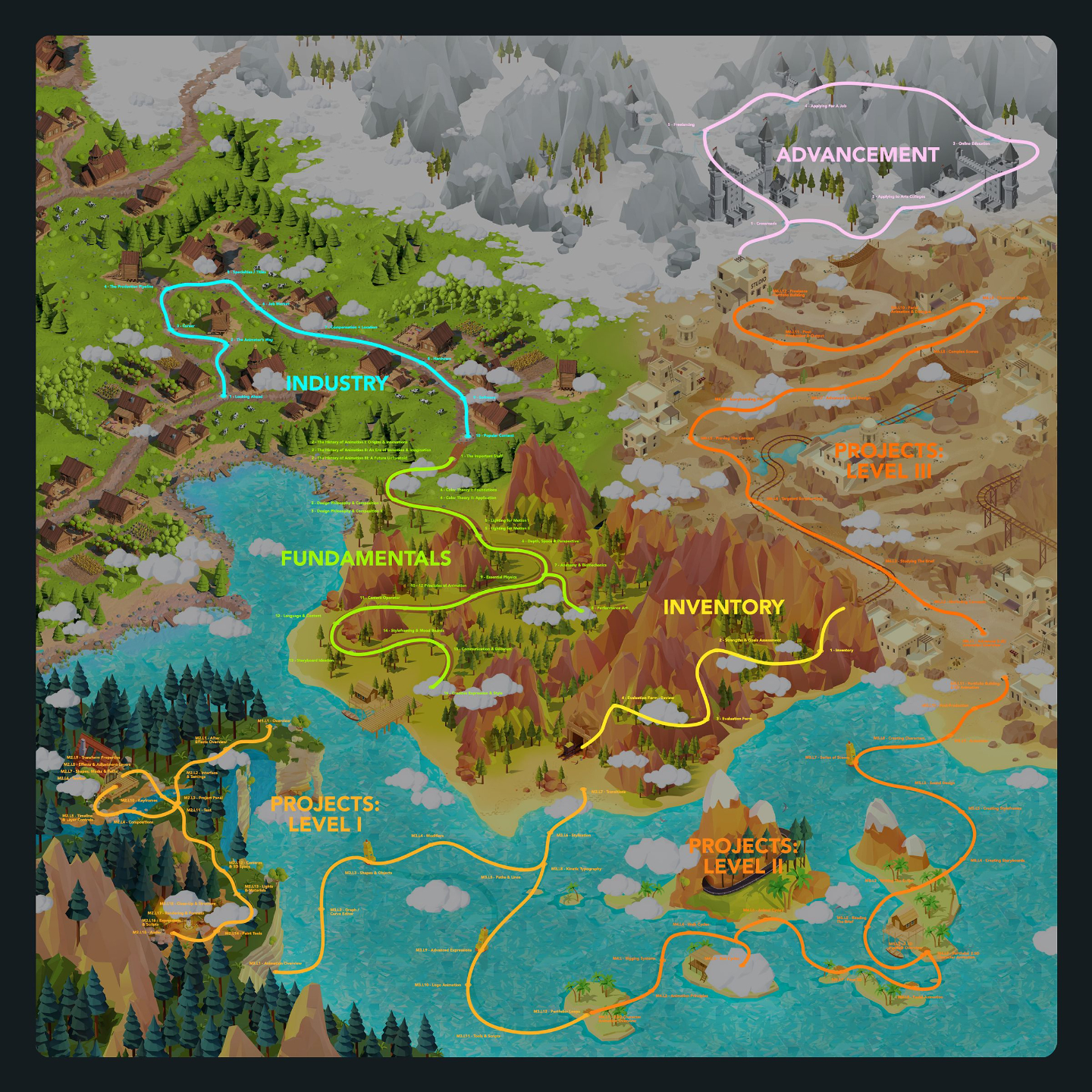
This series of lessons covers all topics relating to the state of the industry, what roles are available, what tools are used, and thinking critically about what your options are for your future with these newly acquired skills.
This is a great way to learn about what's involved in becoming an Animator or Motion Graphics Artist before learning the actual skills and software.
Lessons available for:

Lesson 1: Looking Ahead
This welcome lesson introduces students to the Discovery and Creator curriculums while setting the tone for a practical, career-focused approach to learning animation and motion graphics. Students will get a preview of the industry insights, fundamentals, hands-on projects, advancement paths, and real-world guidance ahead as they begin building toward an industry-ready creative future.
Lesson 6: Job Market
This lesson explores the animation job market and the many places students can build a career, including studios, film and VFX houses, game companies, networks, agencies, brands, small businesses, and startups. Students will learn how full-time, part-time, and freelance opportunities differ across entertainment and business-focused work so they can better understand where their skills may fit.
Lesson 2: The Animators Way
This lesson introduces The Animator’s Way, a motivational look at why animation is both a challenging craft and a deeply rewarding career path built on creativity, technical skill, adaptability, and purpose. Students will also explore how animation remains valuable in an evolving industry, including how AI fits into the creative process while traditional software skills still provide the control, consistency, and intent required for professional work.
Lesson 7: Compensation + Location
This lesson introduces students to the realities of compensation and location in animation, showing how pay can vary based on where you live, your skill level, job title, and whether you work full-time, part-time, or freelance. Students will learn why understanding their value, negotiating fairly, and balancing passion with financial goals are essential parts of building a sustainable creative career.
Lesson 3: Career
This lesson helps students think realistically about animation as a career path, emphasizing that a strong portfolio, clear direction, and persistence matter more than where they learned their skills. Students will explore different creative career paths, compare entertainment and edu-tainment work, and consider education options like art school, online programs, niche training, employment, and freelancing.
Lesson 8: Hardware
This lesson introduces the basic hardware needs for animators and motion graphics artists, showing that while the work is technically complex, the required gear is fairly straightforward. Students will review hardware recommendations for computers, monitors, drawing tablets, and peripherals so they can make smart investments that support their creative work for years.
Lesson 4: The Production Pipeline
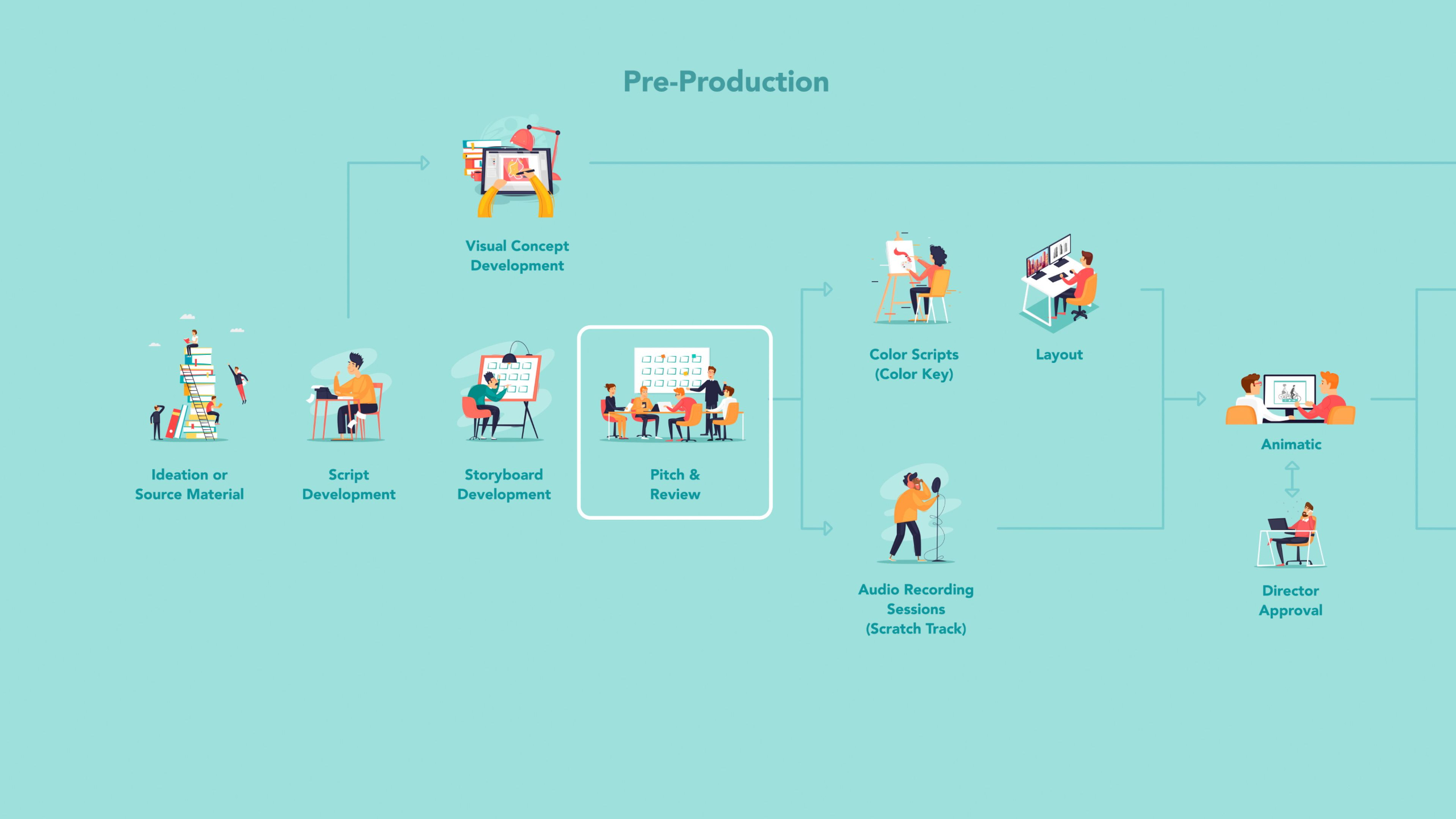
This lesson breaks down the major production pipelines used across 2D animation studios, 3D studios, agencies, game developers, and freelance animation work so students can better understand where animators fit within the larger creative process. Students will learn how pre-production, production, and post-production differ across industries, while also seeing how AI tools may support tasks like rotoscoping, in-betweening, environment creation, and rigging.
Lesson 9: Software
This lesson introduces students to the different types of software used across animation, motion graphics, visual effects, editing, compositing, and sound design. Students will review the software recommendations guide to better understand which tools support different creative paths and which plugins or scripts can help improve their workflow.
Lesson 5: Specialties & Titles
This lesson introduces the many specialties and job titles within animation and motion graphics, helping students understand that studying animation can lead to a wide range of creative and technical career paths. Students will compare 2D animation, 3D animation, and motion graphics while learning how each specialty works, what artists in those roles create, and which direction may fit their interests best.
Lesson 10: Popular Content
This lesson explores the types of content animators and motion graphics artists are commonly asked to create across studios, agencies, game companies, brands, networks, indie productions, and small businesses. Students will learn how different employers use animation—from films, games, VFX, and title packages to explainer videos, social content, infographics, and marketing materials—so they can build a portfolio that feels focused, useful, and hireable.
Lesson 1: Looking Ahead
This welcome lesson introduces students to the Discovery and Creator curriculums while setting the tone for a practical, career-focused approach to learning animation and motion graphics. Students will get a preview of the industry insights, fundamentals, hands-on projects, advancement paths, and real-world guidance ahead as they begin building toward an industry-ready creative future.
Lesson 2: The Animators Way
This lesson introduces The Animator’s Way, a motivational look at why animation is both a challenging craft and a deeply rewarding career path built on creativity, technical skill, adaptability, and purpose. Students will also explore how animation remains valuable in an evolving industry, including how AI fits into the creative process while traditional software skills still provide the control, consistency, and intent required for professional work.
Lesson 3: Career
This lesson helps students think realistically about animation as a career path, emphasizing that a strong portfolio, clear direction, and persistence matter more than where they learned their skills. Students will explore different creative career paths, compare entertainment and edu-tainment work, and consider education options like art school, online programs, niche training, employment, and freelancing.
Lesson 4: The Production Pipeline
This lesson breaks down the major production pipelines used across 2D animation studios, 3D studios, agencies, game developers, and freelance animation work so students can better understand where animators fit within the larger creative process. Students will learn how pre-production, production, and post-production differ across industries, while also seeing how AI tools may support tasks like rotoscoping, in-betweening, environment creation, and rigging.
Lesson 5: Specialties & Titles
This lesson introduces the many specialties and job titles within animation and motion graphics, helping students understand that studying animation can lead to a wide range of creative and technical career paths. Students will compare 2D animation, 3D animation, and motion graphics while learning how each specialty works, what artists in those roles create, and which direction may fit their interests best.
Lesson 6: Job Market
This lesson explores the animation job market and the many places students can build a career, including studios, film and VFX houses, game companies, networks, agencies, brands, small businesses, and startups. Students will learn how full-time, part-time, and freelance opportunities differ across entertainment and business-focused work so they can better understand where their skills may fit.
Lesson 7: Compensation + Location
This lesson introduces students to the realities of compensation and location in animation, showing how pay can vary based on where you live, your skill level, job title, and whether you work full-time, part-time, or freelance. Students will learn why understanding their value, negotiating fairly, and balancing passion with financial goals are essential parts of building a sustainable creative career.
Lesson 8: Hardware
This lesson introduces the basic hardware needs for animators and motion graphics artists, showing that while the work is technically complex, the required gear is fairly straightforward. Students will review hardware recommendations for computers, monitors, drawing tablets, and peripherals so they can make smart investments that support their creative work for years.
Lesson 9: Software
This lesson introduces students to the different types of software used across animation, motion graphics, visual effects, editing, compositing, and sound design. Students will review the software recommendations guide to better understand which tools support different creative paths and which plugins or scripts can help improve their workflow.
Lesson 10: Popular Content
This lesson explores the types of content animators and motion graphics artists are commonly asked to create across studios, agencies, game companies, brands, networks, indie productions, and small businesses. Students will learn how different employers use animation—from films, games, VFX, and title packages to explainer videos, social content, infographics, and marketing materials—so they can build a portfolio that feels focused, useful, and hireable.